A scheduling workspace that feels like your business.
Your team already knows your colours and logo. White Label brings that identity into the place where you schedule people, rooms and resources, then carries it into the customer-facing surfaces you have enabled.
Optional paid add-on · Coming soon. Purchases are unavailable. Northbank Creative is fictional. The workspace image below is captured from the actual interface with fictional data.
Meet Northbank Creative
Ink blue #17354A, seafoam #55C7B0 and warm coral #EF8C74 give this example a consistent identity. Its tagline is “Make room for great work.”
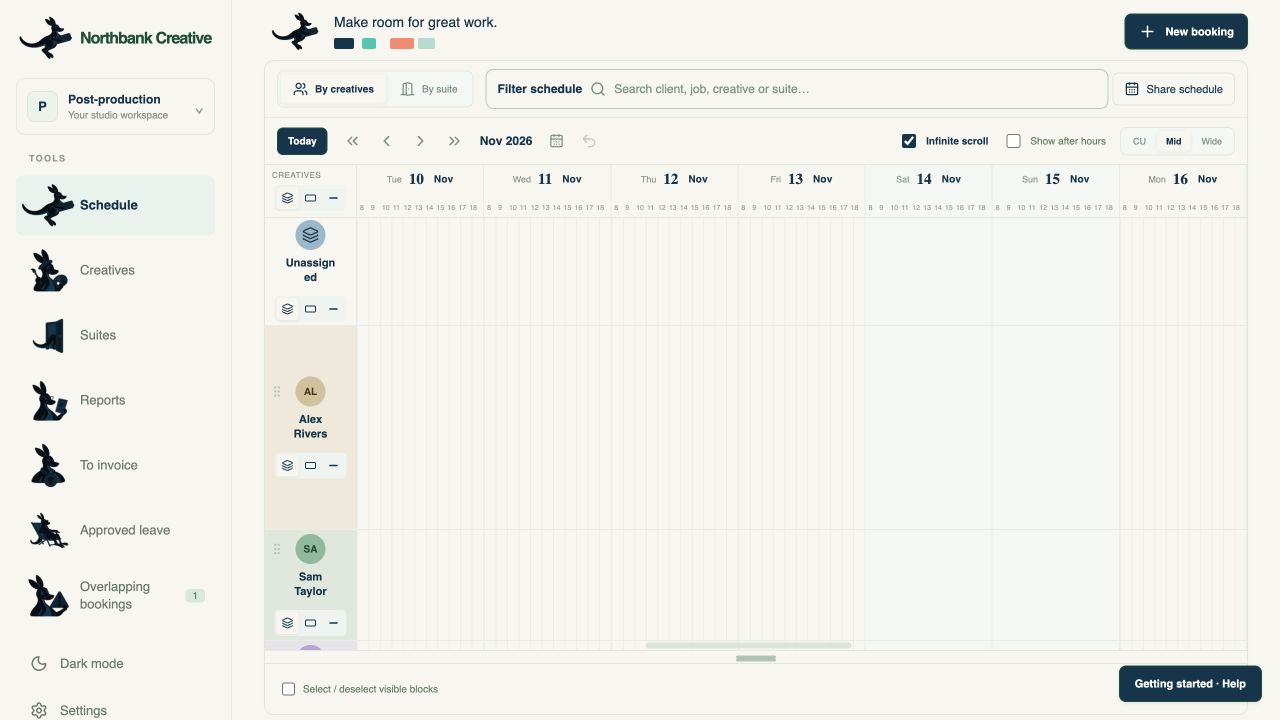
Kangaroo artwork is retained and tinted. Person icons and booking colours keep their separate meanings.
What the superuser controls
Open Branding beside Settings after the package has been installed. Set the business name, upload a PNG or JPEG logo, and edit the tagline—or clear it to hide it. Choose six-digit HEX colours or use the colour picker. A Pantone reference can be recorded alongside an approved digital HEX equivalent.
Four separate colour controls recolour the decorative moving blocks. These controls do not recolour bookings, change scheduling rules or alter anyone’s permissions. Text and background contrast is checked before saving.
Studio interactive visual guide → · School interactive visual guide →
Try the fictional branding controls
Open the interactive example ↗
The example changes no customer workspace and sends no emails.
Carry it through the journey
The installed workspace and sign-in screen use the same identity. Enabled shared schedules can carry the logo and colours; Share schedule remains a separate optional add-on. PDF and print exports carry the business identity while booking colours retain their scheduling meaning.
Workspace emails use the business name and branded HTML alongside a plain-text alternative. Verified sender addresses, reply routing and notification behaviour stay intact. White Label does not include a custom email domain.
CSV has no visual branding, and subscribed calendar appearance belongs to the recipient’s calendar app. These formats remain useful rather than pretending to support logos they cannot display.
One package, matched to your version
White Label is prepared for paid customer installation, not automatically included in Studio or School. Each installation must match the customer’s exact build and enabled add-ons. Its user guide appendix records ADD-000005 · 1.0.0 together with the customer’s full build code.